Kaspi Bank
Overview
|
Kaspi Bank, a popular payment method in Kazakhstan, that allows customers to top up their accounts and offers a convenient way of paying for your services. In the Kaspi Bank payment method, customers make purchases by using a mobile app. Within the payment platform, top up payments are processed by using Gate. Download the logo in the vector format here. |
 |
| Payment method type | Payment kiosks |
|---|---|
| Countries and regions | Kazakhstan |
| Payment currencies | KZT |
| Payment amount limits | Contact your key account manager at JetPay for details. Also you can check the payment amount limits in your project by using Dashboard. |
| Currency conversion |  |
| Purchases |  |
| Payouts | |
| Stored credentials payments | |
| Full refunds | |
| Partial refunds | |
| Chargebacks | |
| Special considerations | |
| Onboarding and access fee | Contact your key account manager at JetPay for details. |
Operations support
| Interfaces | |||
|---|---|---|---|
| Payment Page | Gate | Dashboard | |
| Purchase | |
|
|
You can check the payment amount limits in your project by using Dashboard. To check your payment amount limits, go to Dashboard, select the Projects section, and then click the Payment methods tab.
The following sections provide more information about the payment processing flow and the analysis of completed payments.
Topping up an account
General information
In the Kaspi Bank method, your system is required to do the following when processing a customer account topping up:
- Accept and process the request from JetPay. The processing includes the verification whether the customer account exists within your system.
- Send the response containing the information whether the customer account exists.
- Accept and process the request for the payment ID within your system.
- Send the response with the payment ID to the payment platform.
- Accept the callback with the top up result from the payment platform.
The following figure provides the details of the purchase processing flow in the Kaspi Bank payment method.
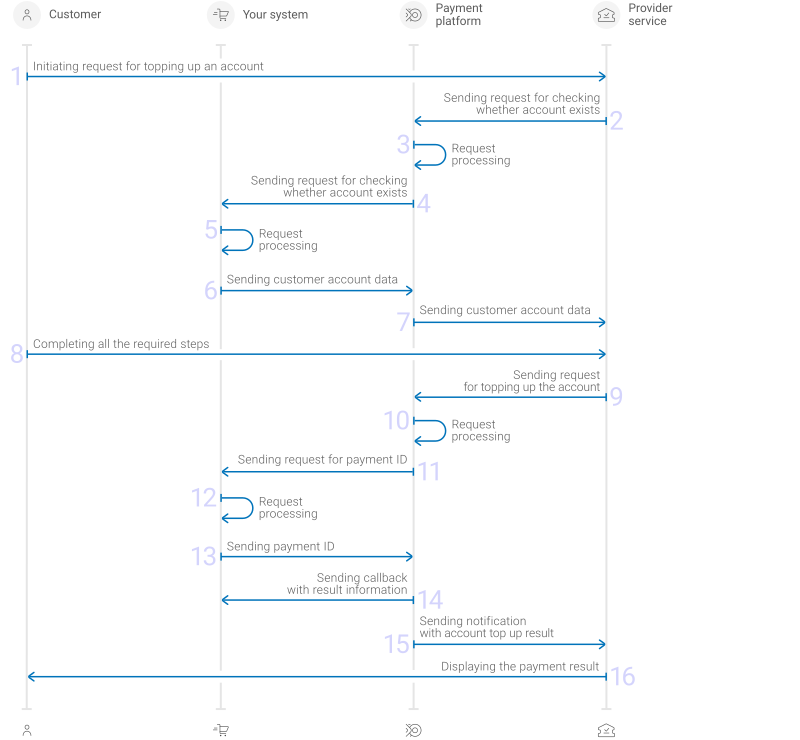
Figure: Topping up an account
- The customer uses a provider app, selects your system, the personal account which he wants to replenish, and then enters his credentials.
- The provider service sends request for checking customer account existence to the JetPay platform.
- The JetPay payment platform performs the initial request processing.
- The payment platform sends request for checking customer account existence to your system.
- Your system processes the request.
- Your system sends a response to the payment platform.
- The payment platform sends customer account data to the provider service.
- The customer completes all the steps required to top up the account.
- The provider sends a request for topping up the account to the JetPay payment platform.
- The JetPay payment platform processes the request.
- The payment platform sends a request for payment ID to your system.
- Your system processes the request.
- Your system sends the payment ID to the payment platform.
- The payment platform sends a callback with the result of account topping up to your system.
- The payment platform sends the result of account topping up to provider service.
- The customer receives the payment result.
Request
verify to check the account's existenceThere are several things you need to consider when dealing with account top up requests in the Kaspi Bank method:
- To verify the existence of the customer account, the payment platform sends the
verifyrequest to your system URL using the HTTP method POST. - The request has the following parameters:
- type—the operation type in your system (always
verify) - customer_id—customer account ID in your system used for topping up from the customer account
- project_id—the project ID you obtained from JetPay
- signature—the signature for the request.
Figure: Example of the data from the request for verifying the customer account
{ "type": "verify", "project_id": 1234, "customer_id": "7123456789", "signature": "e19695449545fac562843ca06e7e0f3e51281ad6" } - type—the operation type in your system (always
- You need to send the response to the
verifyrequest synchronously. The response must contain the following parameters:- code—the response code
- additional_customer_id—the unique customer ID used for the customer identification in the JetPay payment platform. This parameter is required for the response with code
0. - currency—the code of the purchase currency in the ISO-4217 alpha-3 format
- entities.id—contract ID. This parameter is required for the response with code
0. - entities.number—contract number for topping up. This parameter is required for the response with code
0. - entities.payment—purchase amount in minor currency units without any decimal point or comma except for cases where the currency does not have any minor currency units. If the currency has no minor units (that is, the number of digits for minor currency units is zero), then you must set this parameter to the amount in the major currency units. For the information on whether the currency has any minor units, see Currency codes. The parameter may not be required in some cases. Contact your account manager at JetPay for details.
- entities.status_code—contract status code. The default value is
0—online payment is allowed. A value other than0does not allow the payment to be accepted, but will allow the customer to see a preset text when selecting a contract for payment. Additional codes and messages are agreed upon individually, contact your JetPay key account manager for details. This parameter is required for the response with code0.
Table 1. Applicable response codes Code Description 0Success 204No outstanding debts found 400Signature error 404The customer account does not exist 500General error, the reason must be specified in the message parameter Your response can contain the following additional parameters:
- message—the free-form description of the response code
- entities.info—an object with an arbitrary set of fields, used to display additional information to the customer. The structure is customizable, refer to your JetPay key account manager for more information. If the
infoobject contains monetary amounts, set them in major currency units as decimal numbers using a period (.) as the decimal separator and exactly two digits after the decimal separator. - entities.min_payment—minimum allowed purchase amount in minor currency units without any decimal point or comma except for cases where the currency does not have any minor currency units. If the currency has no minor units (that is, the number of digits for minor currency units is zero), then you must set this parameter to the amount in the major currency units. For the information on whether the currency has any minor units, see Currency codes.
Here's an example of a response when the existence account verification is successful.
Figure: Example of the request response
{
    "code": 0,
    "currency": "KZT",
    "entities": [
        {
            "id": "12345",
            "number": "1234_ABC/01-01-2025/Abcdef12",
            "min_payment": 100000,
            "payment": 100000,
            "status_code": 0,
            "info": {
                "total_debt": 5000.00,
                "monthly_payment": 1000.00,
                "customer_name": "John Doe"
            }
        },
        {
            "id": "67890",
            "number": "5678_ABC/01-01-2025/Abcdef34",
            "min_payment": 100000,
            "payment": 150000,
            "status_code": 0,
            "info": {
                "total_debt": 10000.00,
                "monthly_payment": 1500.00,
                "customer_name": "John Doe"
            }
        },
        {
            "id": "11131",
            "number": "9101_ABC/01-01-2025/Abcdef56",
            "payment": 0,
            "status_code": 409
        }
    ],
    "additional_customer_id": "ABCDE12345"
}
If the request cannot be processed or the requested account is not found, the response should contain the
404response code and the error description in themessageparameter.Figure: Example of the request response with an error
{
    "code": 404,
    "message": "Account does not exist"
}
check_deposit for the transaction IDThere are several things you need to consider when dealing with requests for the transaction ID:
- The payment platform sends the
check_depositrequest for the transaction ID to your system URL using HTTP method POST. - The request contains the following parameters:
- type—the operation type in your system (always
check_deposit) - project_id—the project ID you obtained from JetPay
- customer_id—customer account ID in your system used for topping up from the customer account
- entity_id—contract ID for topping up
- number—contract number for topping up
- amount—purchase amount in minor currency units without any decimal point or comma except for cases where the currency does not have any minor currency units. If the currency has no minor units (that is, the number of digits for minor currency units is zero), then you must set this parameter to the amount in the major currency units. For the information on whether the currency has any minor units, see Currency codes
- currency—code of purchase currency in the ISO-4217 alpha-3 format
- payment_method—the payment ID. The value of the parameter is always
terminal/kaspi - signature—the signature for the request.
Figure: Example of the request for the transaction ID on the web service side
{ "type": "check_deposit", "project_id": 1234, "customer_id": "123456789", "entity_id": "12345", "number": "1234_ABC/01-01-2025/Abcdef12", "amount": 10000, "currency": "KZT", "payment_method": "terminal/kaspi", "signature": "lY0LTSAzpR7zGce5qfYGacOuYlHANnkIR7mdOqRXJnL1kO0lUmkQ0YYLWRg==" } - type—the operation type in your system (always
- You must respond to the
check_depositrequest synchronously. The response must contain the following parameters:- code—the response code
- payment_id—the payment ID unique in your system. This parameter is required for the response with code
0
Table 2. Applicable response codes Code Description 0Success 400Signature error 404The customer account does not exist 500General error, the reason must be specified in the message parameter Your response can have the following additional parameters:- message—the free-form description of the response code
- description—the description of the payment
The response to the request for the transaction ID in your system must contain the response code and the unique transaction ID.
Figure: Example of the response with the transaction ID
{
    "code": 0,
    "payment_id": "payment_47",
    "description": "Success"
}
If the transaction ID cannot be found, the response must contain the response code and the error description in the
messageparameter.Figure: Example of the response with the information about an error
{
    "code": 500,
    "message": "Something went wrong"
}
Callback
In the Kaspi Bank payment method, the payment platform returns the purchase result in a callback. For the information about the callback structure, see Callbacks in Gate.
The following is an example of a callback body with the information about a successfully completed purchase.
Figure: Example of the data from a successful purchase callback
{
    "project_id": 1234,
    "payment": {
        "id": "payment_47",
        "type": "purchase",
        "status": "success",
        "date": "2022-03-25T11:08:45+0000",
        "method": "kaspi",
        "sum": {
            "amount": 10000,
            "currency": "KZT"
        },
        "description": ""
    },
    "account": {
        "number": "1234567890"
    },
    "customer": {
        "id": "customer_123"
    },
    "operation": {
        "id": 28,
        "type": "sale",
        "status": "success",
        "date": "2022-03-25T11:08:45+0000",
        "created_date": "2022-03-25T11:08:05+0000",
        "request_id": "9e32835fb27907e0b08569d7d150e387a16a80e336c5117242b5cf60a4e17839",
        "sum_initial": {
            "amount": 10000,
            "currency": "KZT"
        },
        "sum_converted": {
            "amount": 10000,
            "currency": "KZT"
        },
        "code": "0",
        "message": "Success",
        "provider": {
            "id": 12345,
            "payment_id": "123abc123-321",
            "auth_code": ""
        }
    },
    "signature": "U7HQO7ToISZhMPKdM4Xr4DSX2UuHp99rHrtaxkUKQtoYzFvoB3cs9CRd4xeYG2Q=="
}
The following is an example of a callback for a declined purchase.
Figure: Example of the data from a declined purchase callback
{
    "project_id": 1234,
    "payment": {
        "id": "payment_47",
        "type": "purchase",
        "status": "decline",
        "date": "2022-03-25T11:20:30+0000",
        "method": "kaspi",
        "sum": {
            "amount": 10000,
            "currency": "KZT"
        },
        "description": ""
    },
    "account": {
        "number": "1234567890"
    },
    "customer": {
        "id": "customer_123"
    },
    "operation": {
        "id": 31,
        "type": "sale",
        "status": "decline",
        "date": "2022-03-25T11:20:30+0000",
        "created_date": "2022-03-25T11:19:53+0000",
        "request_id": "fff3d5f8d5d31bc460b68b57dc63f4b482e906eb",
        "sum_initial": {
            "amount": 10000,
            "currency": "KZT"
        },
        "sum_converted": {
            "amount": 10000,
            "currency": "KZT"
        },
        "code": "20000",
        "message": "General decline",
        "provider": {
            "id": 15923,
            "payment_id": "0cf4215c-8978",
            "auth_code": ""
        }
    },
    "signature": "J7W15rkqrLzTCD4HkoM4qoEnlVlfqz8155QSlXJKR4m8C4z2iFYv58P4VnHANu445/jmY+g=="
}
Related topics
Analysis of payments results
As with other payment methods JetPay offers, when using this method, you have several options to analyze the information about payments and operations.
You can load and analyze all the necessary information in Dashboard (dashboard.jetpay.kz), for instance you can use the analytic panels in the Analytics section for this purpose.
Also, you can export the information for further analysis by using third party analytical tools. The following options are available:
- Dashboard allows you to download reports in CSV format by using the tools in the Reports section. You can perform export as a one-time or regular download of data to your local computer.
- Data API allows you to have payment information exported in JSON format and delivered to a URL you specify. The payment information is exported by means of sending requests to the /operations/get endpoint.
If you have any further questions regarding payment data analysis, contact JetPay technical support.